Retrieval-Augmented Generation: why scrapping a website isn't as easy as you might think
To retrieve pertinent content from the pages of a website there are many things to consider. It's what we will explore together.
You will find below an example in python on how to get the raw source code from an URL.
import requestsdef fetch_source_code(url: str) -> Tuple[int, Optional[str]]: # Send a GET request to the URL response = requests.get(url) status_code = response.status_code # Check if the request was successful if status_code == 200: return status_code, response.text return status_code, NoneYou will find below an example source code, still in python, on how to use selenium and chromedriver to get the html structure of the page after it was fully loaded.
from chromedriver_py import binary_pathfrom selenium import webdriverfrom selenium.webdriver.common.by import Byfrom contextlib import contextmanager@contextmanagerdef get_driver(): driver = None try: svc = webdriver.ChromeService(executable_path=binary_path) options = webdriver.ChromeOptions() options.add_argument("--headless=new") driver = webdriver.Chrome(service=svc, options=options) yield driver finally: if driver: driver.close()def fetch_page_dom(driver, url: str) -> str: driver.get(url) return driver.page_source# usagewith get_driver() as driver: html_str = fetch_page_dom(driver, "https://...") (We use a context manager here to ensure the driver is closed when you have finished working with it.)
What you need to consider after you have retrieved the HTML structure of a page
At this point we expect you managed to list all the pages from the target website and to have retrieved their HTML structure.
Not all content is good content.
Identifying pages to exclude from ingestion
While scanning a website to ingest content in a knowledge base to be used for Retrieval-Augmented Generation, it is essential to filter out pages that don’t contain meaningful information. Indeed some pages have an auxiliary purpose and are unlikely to provide valuable content for retrieval tasks.
Some example of such pages:
- Sitemap pages: they only exist to provide links to all of most pages of the website,
- Aggregator pages in general: like the sitemap they primarily contains lists of links,
- Action pages: the kind of pages that mostly contain a form, like a contact form, login or registration pages, …
- Legal and compliance pages: like privacy policy and terms of service pages, it is very unlikely that someone will ask a question about those.
Why skipping those pages?
By doing so we reduce the number of documents in the knowledge base and reduce the risk of the retrieval task to provide irrelevant content to the generation task.
Get only relevant parts from a webpage
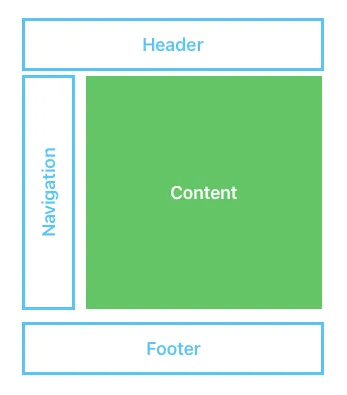
Illustration by the author
Define rules to ignore elements from webpage
Every page contains irrelevant or repetitive elements. Those should be ignored during ingestion. Those parts include:
- header: often declared with an
tag, - footer: often declared with an
- navigation elements: they can use
- social media links,
- generic lists of links.
Trying to identify core content
Even after having filtered out parts you know for sure doesn’t need to be considered, you might want to try to extract the main content from the webpage.
As a matter of fact you can also start by extracting the main content and then removing from it undesirable elements
Often the main content is declared with an
or an
heading tag as they are often placed at the start of the main content.
You might want to manually check multiple pages from your target website to determine which strategy is the best adapted for your use case.
Extracting information from the HTML structure
At that point you should have found a way to only retrieve the HTML part of the webpage that matters to your use case. Now the question is how you enable your RAG system to retrieve information from it?
By looking at the number of indexes classes made available by the LlamaIndex framework you can realize that there are also decisions to be made at that point.
Using a semantic search / vector index?
This is the “classical” way of doing so, usually the HTML is converted to plain text, then chunked into smaller part. Each part will then be converted to embedding and stored into a vector database for later query.
In my humble opinion, you shouldn’t directly convert from HTML to plain text, you should first convert from HTML to markdown format. The reason being that during the direct conversion to plain text you lost the structure of the web page: what text was an header, what part was written in bold, …
When converting to markdown format you will still lose a bit of the structure, but less, and you can use the structure itself to help you have a better chunking mechanism that will keep related parts together.
Semantic search is often enough to answer general questions, but it has several limitations like the risk of not retrieving relevant information to answer a query because the related content in the original webpage has been spitted into multiple chunks, which reduces the odds of actually retrieving them using semantic search.
Using a full-text / BM25 index?
In the case of RAG the full-text search is often performed on the same chunks than semantic search, the idea being having an hybrid search between a keyword based search and a semantic search.
Using a knowledge graph index?
In a knowledge graph we extract information in the form of triplets subject-predicate-object. From a given text we will be able to extract numerous triplets.
ie: from the sentence “the white cat is meowing”, we could determine two triplets:
- the cat — is — white
- the cat — is — meowing
I will not give you explanation here on how this extraction is done, as it is not the point of this article, but if you are curious about this subject you might want to read a previous article I wrote:
When used in a RAG system, knowledge graphs will help focusing on details like fetching all information about a subject (ie: get all data about the cat, even if they are scattered throughout the original document).
The use case is distinct from semantic search,
- semantic search: try to find relevant chunks of text using the global meaning,
- knowledge graph search: try to find relevant triplets using a query based on the subject, the predicate, the object or a combination of many
Using a summary index?
This kind of index is used when you need to consider a whole document to construct a summary.
The original document is also chunked like in a semantic search, but the generation will iterate over all parts, optionally excluding some based on a filter, to generate a result.
If the original document is too big, we can first generate x partial summaries and then synthesize them together.
How to choose the kind of index to create for your knowledge base?
In my humble opinion you might want to consider creating many kind of indexes and then use an agent/a tool selection at query time to select the one most adapted to handle the question.
GenAI: Select a tool/agent based on a user query
To conclude
I know that this articles might leave you with more questions than answers, but I do hope I’ve made you understand that building a knowledge base from a website is far from an easy task. I hope I’ve given you the keys you need to ask the right questions to choose/realize the right solution for your needs.
That’s all folks!