Python: A little hack to display the progression on your User Interface (UI)
How I use monkey patching to easily display a real-time progress indicator. Spoiler alert: it's tqdm which is monkey-patched.
This time I will talk about the result before explaining things.
Displaying the progression
The User Interface
(It is a Conversational User Interface to be more specific)
Screenshot by the author
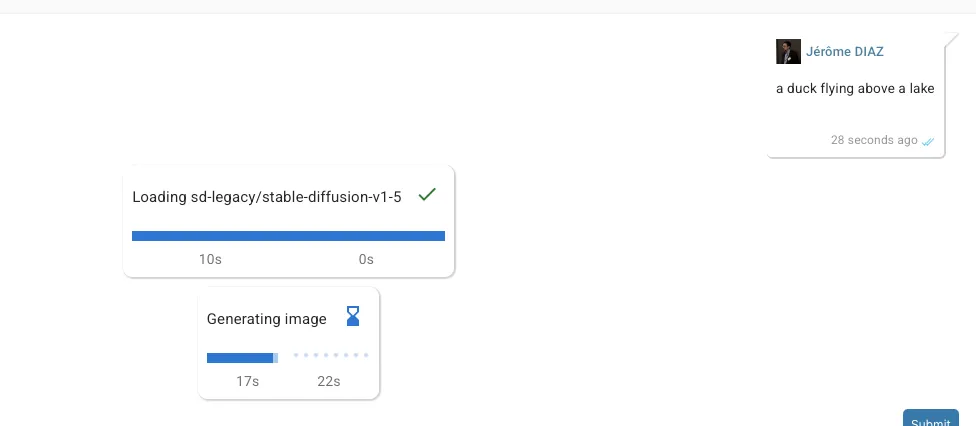
You can see:
- a first task “loading sd-legacy…” that has already been completed and lasted 10s.
- a second task “Generating image” still in progress. It started 17s ago, is expected to end in 22s. The blue progress bar is updated every time a step (the image generation was configured to use 50 steps) has been completed. The light blue progress bar below is refreshed more often and represents the ‘real time’ progression based on the elapsed time and the expected remaining time.
Adding the progression bar
As for how I add a progress bar in my process, it is as easy as replacing…
image = pipe(
    prompt,
    num_inference_steps=params.num_inference_steps,
    guidance_scale=params.guidance_scale,
    negative_prompt=negative_prompt,
    height=height,
    width=width,
).images[0]
… by:
async with chat_context.add_tqdm_progression(
    context, "Generating image", "agent:system"
):
    image = pipe(
        prompt,
        num_inference_steps=params.num_inference_steps,
        guidance_scale=params.guidance_scale,
        negative_prompt=negative_prompt,
        height=height,
        width=width,
    ).images[0]
For the record, I used this in a personal project to test running stable diffusion from my project (about task orchestration and knowledge management) as a way to find ideas to improve the project itself. It runs on a M1 Mac-mini with 16Gb of unified memory.
The explanation
You most probably have already seen a progression indicator on your terminal when launching some scripts.

Example of a progression indicator visible in a terminal console.
Do you know that most of the time (maybe always) it is the same library that is used to display those progress indicators?
TQDM..
…is the name of this library. It is so easy to use that is as become quite a standard.
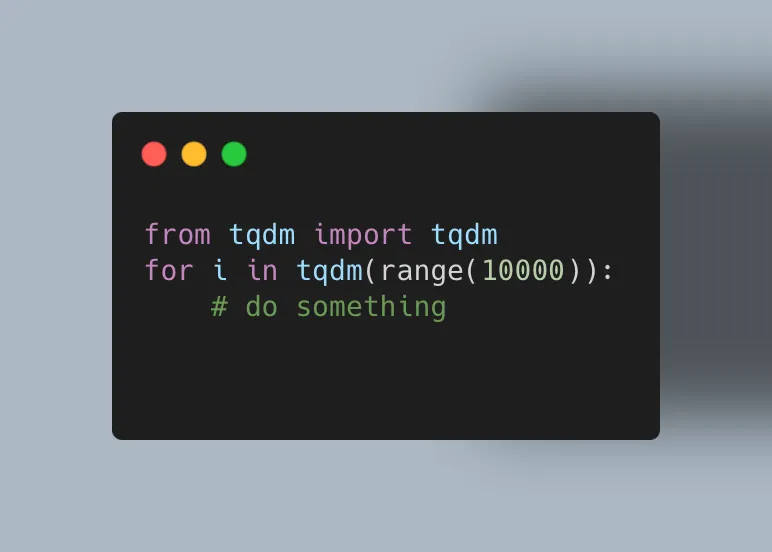
TQDM is easy to use, all it takes is an iterable!
There are many options you can use like a description, but that’s not what we want to cover here.
Monkey patching…
…is the act of changing the behavior of a code during its execution.
If you know that a library will be used, you can change its behavior in order to achieve something else.
A year ago (septembre 2024) some user encountered the same kind of needs that I had and proposed a solution to hack tqdm to display the progression in streamlit.
streamlit is a python framework to easily build a web application it is mostly used for data related task and is not really intended to be use in a production context.
The idea he proposed was quite simple and elegant: to monkey patch tqdm in order to be notified when the progression changed and so update the UI in response.
Well, I quite did the same thing.
My own version
I use a context manager to both activate/deactivate the monkey patching.
You won’t be able to use this code directly on your project but it can inspire you to create your version based on your own needs.
The context manager
import asyncio
from threading import Thread
from types import TracebackType
from typing import Protocol, TYPE_CHECKING, Optional, Any

from applications.chat.models.chat_progress_message import ChatProgressMessage

if TYPE_CHECKING:
    from tqdm import tqdm
    from core.context.context import Context
    from applications.chat.context.chat_context import ChatContext

class TQDMCallback(Protocol):
    def __call__(
        self, progress: float, elapsed: float, remaining: Optional[float], done: bool
    ): ...

class ProgressionContext:
    """
    Represents a context manager for handling chat progression updates within an asynchronous
    environment.

    This class encapsulates the logic required to manage and update progression messages
    in a chat interface. It integrates functionality for real-time feedback regarding
    the update state of a process using mechanisms such as the `tqdm` library, while
    ensuring that all updates are efficiently handled and displayed to the user.

    Attributes:
        context (Context): The main context that this progression context is associated with.
        chat_context (ChatContext): Cast version of the provided context specifically
            adapted for handling chat-related information and processes.
        text (str): The initial text content for the progression message.
        from_user (str): Identifier for the user initiating the progression context.
        kwargs (dict): Additional keyword arguments providing extended customization
            for the progression message handling logic.
        message (Optional[ChatProgressMessage]): Represents the message being updated
            throughout the lifecycle of the context manager.
    """
    def __init__(self, context: "Context", text: str, from_user: str, **kwargs: Any):
        from applications.chat.context.chat_context import ChatContext
        self.context = context
        self.chat_context: "ChatContext" = context.cast_as(ChatContext)
        self.text = text
        self.from_user = from_user
        self.kwargs = kwargs
        self.message: Optional[ChatProgressMessage] = None

    async def __aenter__(self):
        """
        Manages the asynchronous context for progression handling and updating chat messages.

        This method sets up a chat message instance for progression updates and links it to
        the chat context. It also modifies the behavior of the `tqdm` library to provide
        real-time updates on progression events within the asynchronous environment.

        Returns:
            The instance itself to ensure it can be properly used in an asynchronous
            context management workflow.

        Raises:
            Any exceptions emitted during the setup or execution of this method will
            propagate as they are not explicitly handled within this block.
        """
        self.message = ChatProgressMessage(
            chat_id=self.chat_context.chat_id,
            text=self.text,
            message_index=self.chat_context.message_count,
            from_user=self.from_user,
            **self.kwargs,
        )

        await self.chat_context.add_message(self.context, self.message, True)

        def callback(
            progress: float, elapsed: float, remaining: Optional[float], done: bool
        ):
            # TODO: use a single thread and an event queue
            async def _emit_progression():
                self.message.update_progress(progress, elapsed, remaining, done)

                await self.chat_context.update_message(self.context, self.message)

            def target():
                asyncio.run(_emit_progression())

            t = Thread(target=target, daemon=True)

            t.start()

        from tqdm.auto import tqdm

        self._original_update = tqdm.update
        self._original_del = tqdm.__del__

        def patched_update(tqdm_instance: "tqdm", n: float = 1):
            if tqdm_instance.n is not None and tqdm_instance.total is not None:
                rate = tqdm_instance.format_dict["rate"]

                elapsed = tqdm_instance.format_dict["elapsed"]
                remaining = (
                    (tqdm_instance.total - tqdm_instance.n) / rate if rate and tqdm_instance.total else None
                )

                callback(tqdm_instance.n / tqdm_instance.total, elapsed, remaining, False)

            return self._original_update(tqdm_instance, n)

        def __del__(tqdm: "tqdm"):
            callback(1, tqdm.format_dict["elapsed"], 0, True)
            self._original_del(tqdm)

        tqdm.update = patched_update
        tqdm.__del__ = __del__

        return self

    async def __aexit__(
        self,
        exc_type: type[BaseException] | None,
        exc_val: BaseException | None,
        exc_tb: TracebackType | None,
    ):
        """
        Manages the asynchronous context exit workflow for the object. This method is
        called when the asynchronous context manager is exited. It handles setting
        errors to a message object if an exception occurs, as well as restoring
        original functionality to overridden `tqdm` methods.

        Args:
            exc_type (type[BaseException] | None): The type of the exception being
                handled, or None if no exception occurred.
            exc_val (BaseException | None): The exception instance being handled,
                or None if no exception occurred.
            exc_tb (TracebackType | None): The traceback object associated with the
                current exception, or None if no exception occurred.
        """
        message = self.message
        if exc_val is not None and message:
            # if an exception occurred, we set the error message and update the message
            message.set_error(str(exc_val))
            await self.chat_context.update_message(self.context, message)

        from tqdm.auto import tqdm

        tqdm.update = self._original_update
        tqdm.__del__ = self._original_del
Preparing the context manager
class ChatContext(Context):
    def add_tqdm_progression(
        self,
        context: "Context",
        message: str,
        from_user: str,
        **kwargs,
    ) -> ProgressionContext:

        return ProgressionContext(context, message, from_user, **kwargs)
This method is not required anymore but is kept due to a planned change in my todo list about how the contexts are handled.
The ChatProgressMessage
It defines what is persisted and transmitted to the user interface, either directly using a web-socket or indirectly in worker mode using first a RabbitMQ broker.
import time
from enum import StrEnum
from typing import Mapping, Any, Optional, Dict

from pydantic import Field

from applications.chat.models.a_chat_message import AChatMessage

class ProgressionStatus(StrEnum):
    IDLE = "idle"
    RUNNING = "running"
    ENDED = "ended"
    FAILED = "failed"

class ChatProgressMessage(AChatMessage):
    META_MODEL = "chat_progress_message"

    type: str = "progress"
    text: str
    progress: Optional[float] = 0

    started_at: Optional[float] = Field(None, alias="startedAt")
    ends_at: Optional[float] = Field(None, alias="endsAt")

    progression_status: ProgressionStatus = Field(
        ProgressionStatus.IDLE, alias="progressionStatus"
    )
    error: Optional[str] = None

    def update_progress(
        self,
        progress: float,
        elapsed_time: float,
        remaining_time: Optional[float],
        finished: bool,
    ):
        self.progress = progress
        if finished:
            if self.progression_status != ProgressionStatus.FAILED:
                self.progression_status = ProgressionStatus.ENDED
        else:
            if self.progression_status == ProgressionStatus.IDLE:
                self.started_at = time.time() - elapsed_time
                self.progression_status = ProgressionStatus.RUNNING
            if remaining_time is not None:
                self.ends_at = time.time() + remaining_time

    def set_error(self, error: str):
        self.error = error
        self.ends_at = time.time()
        self.progression_status = ProgressionStatus.FAILED

    def as_dict(self, **kwargs) -> Mapping[str, Any]:
        # TODO: remove this implementation to use the default one from AModel
        dict_value: Dict[str, Any] = {
            **super().as_dict(**kwargs),
            "text": self.text,
            "progressionStatus": self.progression_status.value,
        }

        if self.progress is not None:
            dict_value["progress"] = self.progress
        if self.error:
            dict_value["error"] = self.error
        if self.started_at is not None:
            dict_value["startedAt"] = self.started_at
        if self.ends_at is not None:
            dict_value["endsAt"] = self.ends_at

        return dict_value
What is interesting here is that instead of transmitting the elapsed and remaining durations, what we work with are timestamps: numbers representing:
- when the task started,
- when the task ended/is expected to end.
The React part (user interface)
When the task is running (and only when the task is running), an interval will trigger a re-render every 750ms, effectively updating:
- the elapsed duration,
- the remaining duration,
- the ‘buffer’ / time based progression indicator.
import Box from "@mui/material/Box";
import Markdown from "react-markdown";
import CheckIcon from "@mui/icons-material/Check";
import HourglassBottomIcon from "@mui/icons-material/HourglassBottom";
import { LinearProgress } from "react-admin";
import Typography from "@mui/material/Typography";
import React, { FC, useEffect, useMemo, useState } from "react";

import { ProgressMessageType } from "./types";
import { formatDuration } from "./utils";

type ProgressionMessageProps = {
  message: ProgressMessageType;
};

const ProgressionMessage: FC<ProgressionMessageProps> = (props) => {
  const { message } = props;

  const [now, setNow] = useState<number>(0);

  // the started duration is the time spent since the task started
  // (or the total duration of the task if it has already ended)
  const startedDuration = useMemo(() => {
    switch (message.progressionStatus) {
      case "ended":
      case "failed":
        if (message.startedAt === undefined || message.endsAt === undefined) {
          return -1;
        }

        return Math.round(message.endsAt - message.startedAt);
      case "idle":
        return -1;
      case "running":
        if (now === 0 || message.startedAt === undefined) {
          return -1;
        }
        return Math.round(now - message.startedAt);
    }
  }, [now, message.progressionStatus, message.endsAt, message.startedAt]);

  // the remaining duration is the time remaining before the task ends
  const remainingDuration = useMemo(() => {
    switch (message.progressionStatus) {
      case "ended":
      case "failed":
        return 0;
      case "idle":
        return -1;
      case "running":
        if (now === 0 || message.endsAt === undefined) {
          return -1;
        }
        return Math.round(message.endsAt - now);
    }
  }, [now, message.progressionStatus, message.endsAt]);

  // buffer is the progress of the task based on the current time
  const buffer = useMemo(() => {
    switch (message.progressionStatus) {
      case "ended":
      case "failed":
        return message.progress;
      case "idle":
        return -1;
      case "running":
        if (now === 0 || startedDuration < 0 || remainingDuration < 0) {
          return message.progress;
        }

        return Math.min(
          1,
          startedDuration / (startedDuration + remainingDuration),
        );
    }
  }, [
    message.progressionStatus,
    message.progress,
    now,
    startedDuration,
    remainingDuration,
  ]);

  useEffect(() => {
    // no need to update if not running
    if (message.progressionStatus !== "running") {
      return;
    }

    const interval = setInterval(() => {
      // it will trigger a rerender each time
      setNow(Date.now() / 1000);
    }, 750);
    return () => {
      clearInterval(interval);
    };
  }, [message.progressionStatus]);

  // TODO: handle displaying error messages

  return (
    <>
      <Box sx={{ display: "flex", alignItems: "center" }}>
        <Box sx={{ width: "100%", mr: 1 }}>
          <Markdown>{message.text}</Markdown>
        </Box>
        <Box sx={{ minWidth: 35 }}>
          {message.progressionStatus === "ended" && (
            <CheckIcon color="success" />
          )}
          {message.progressionStatus === "running" && (
            <HourglassBottomIcon color="primary" />
          )}
        </Box>
      </Box>
      <Box sx={{ width: "100%" }}>
        {message.progress === undefined && (
          <LinearProgress variant={"indeterminate"} />
        )}
        {message.progress !== undefined &&
          (buffer === undefined || buffer < 0) && (
            <LinearProgress
              variant="determinate"
              value={message.progress * 100}
              sx={{
                width: "100%",
                height: 10,
              }}
            />
          )}
        {message.progress !== undefined &&
          buffer !== undefined &&
          buffer >= 0 && (
            <LinearProgress
              variant="buffer"
              value={message.progress * 100}
              valueBuffer={buffer * 100}
              sx={{
                width: "100%",
                height: 10,
              }}
            />
          )}
      </Box>
      <Box sx={{ display: "flex", alignItems: "center" }}>
        <Box sx={{ width: "50%" }}>
          <Typography
            variant="body2"
            sx={{ color: "text.secondary" }}
          >{`${formatDuration(startedDuration)}`}</Typography>
        </Box>

        <Box sx={{ width: "50%" }}>
          <Typography
            variant="body2"
            sx={{ color: "text.secondary" }}
          >{`${formatDuration(remainingDuration)}`}</Typography>
        </Box>
      </Box>
    </>
  );
};

export default ProgressionMessage;
To conclude
I feel like I’ve forgotten something…
…
the result image!
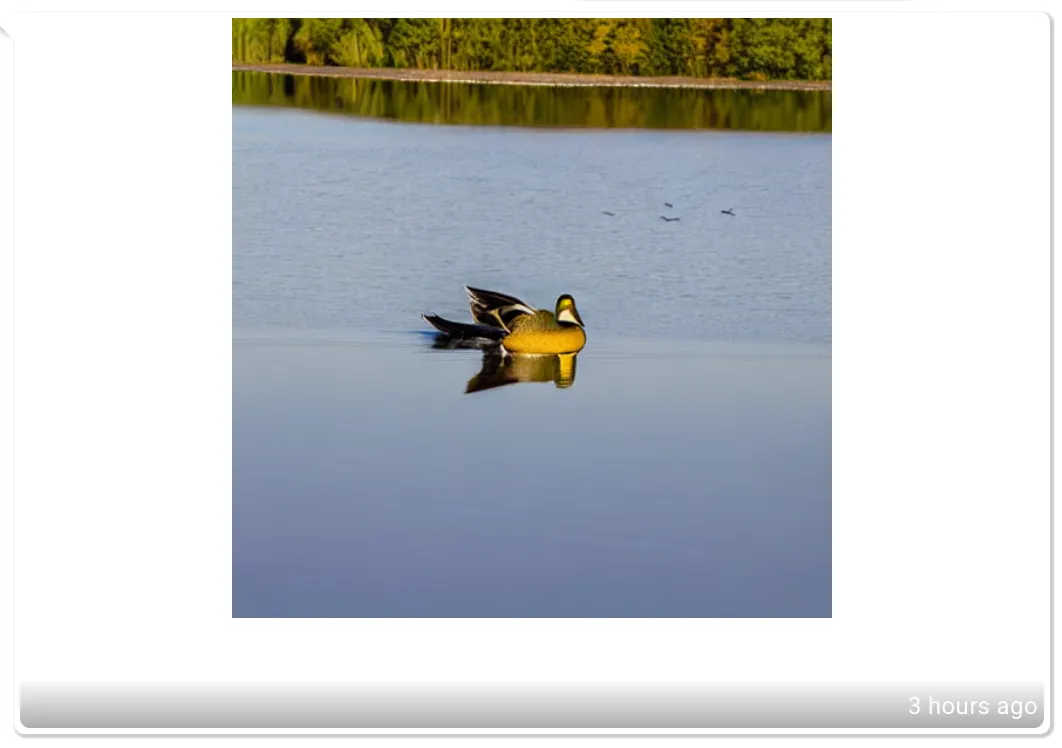
“A duck flying above a lake” using stable diffusion 1.5
The role of a software developer is not about writing the same thing again and again (which tend to be forgotten by those relying too much on AI source code generation), it is about writing functions so that you can reuse them easily multiple times on your software!
Use the DRY (Don’t repeat yourself) principle, not the WET one (write everything twice, we enjoy typing, waste everyone’s time)
That’s all folks!